


About the Power Prompt Series
Each month, I’ll share a new “Power Prompt” designed to help travel advisors harness the power of AI — without the tech overwhelm. These bite-sized guides turn AI into a friendly creative partner, showing you how to use simple, strategic prompts to grow your business, save time and spark inspiration. Whether you’re crafting social media content, refining client communication or uncovering travel trends, each Power Prompt makes AI fun, approachable and human. Think of it as your monthly master key to working smarter — not harder — with the help of smart tech.
Wrong Cabin - Wrong Model
It's 3pm on a Tuesday. You've been in and out of Claude all day — drafting a honeymoon itinerary for Bali, rewriting a client email about a schedule change, pulling together talking points for a supplier call. Then the message pops up: you've hit your usage limit.
Your first thought is probably “I need a bigger plan.” But before you reach for your wallet, it's worth asking a different question: is the plan too small, or are you just burning through it faster than you need to?
For most people, it's the second one. And the biggest leak — by far — is using the wrong model for the job.
The Cabin Class Problem
Picture this: a client asks you to confirm one hotel date. You wouldn’t book them business class for a 45-minute puddle jump to catch a connection, and you wouldn't wedge them into a cramped middle seat for a 14-hour haul to Singapore. You match the cabin to the journey — every single day, without even thinking about it. But that exact instinct disappears the moment people sit down to prompt Claude, and it’s costing them.
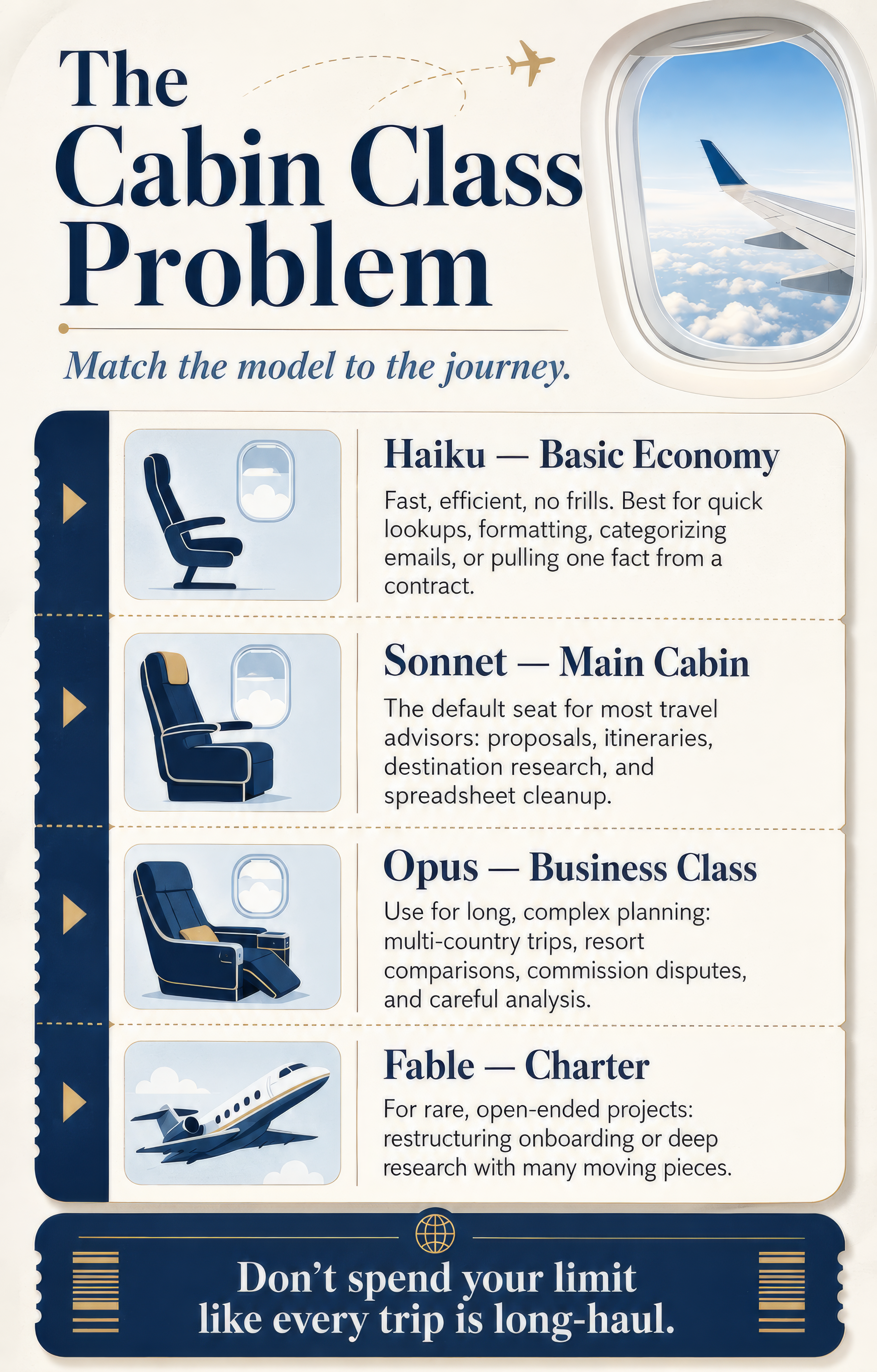
Claude comes in four tiers, and each one is really a different cabin class:
Haiku — Basic Economy.
No frills, boards fast, gets the job done. Use it for quick lookups, formatting a packing list, categorizing a stack of inquiry emails or pulling a single fact out of a supplier contract. It’s the most efficient model with your rate limit, and for anything simple, it’s genuinely just as capable as a heavier model — only faster.
Sonnet — The Seat Most of Your Clients Actually Book.
Comfortable, dependable, handles nearly any itinerary without complaint. This is the model most travel advisors should default to for almost everything: drafting a client proposal, writing a multi-day itinerary, researching a destination or cleaning up a spreadsheet of group deposits. If you're not sure which model to pick, start here.
Opus — Business-Class Upgrade.
Worth it when the trip is long and complicated enough that you need to arrive sharp. This is for the planning that actually requires sustained, careful thinking: a 12-stop multi-country itinerary with connections that all need to line up, a detailed comparison of five all-inclusive resorts against a picky client's must-haves or untangling a messy commission dispute across several bookings. It costs more of your limit, so save it for problems that genuinely need that depth.
Fable — Chartering the Plane.
This is Anthropic's newest and most capable tier, sitting above Opus. It's built for the hardest, most open-ended work — think restructuring your entire client onboarding system from scratch, or a long research project with dozens of moving pieces. Most travel advisors won't need it for day-to-day client work, but it's there for the rare project that's too big and too ambiguous for anything else.
(Quick note on access: free Claude accounts include Haiku and Sonnet. Paid plans add Opus and Fable, along with a higher rate limit.)
The fix isn't complicated. Before you type your prompt, ask: does this need basic economy, or does it need the business-class seat? Most of what crosses an advisor's desk in a day is a basic economy job. You'd never book the wrong cabin for a client — so why book the wrong model for yourself?
How Hard Should Claude Think?
There's a second dial most people never touch, and it matters almost as much as picking the model: the Effort Setting.
Think of it like the difference between asking the front desk a quick question and booking a full consultation. If you ask the concierge what time breakfast starts, you don't want them pulling out a notepad and researching for twenty minutes — you want a fast, confident answer. But if you're asking them to plan a surprise anniversary dinner with dietary restrictions, a view and a specific vibe, you want them to actually sit with it.
Claude's effort setting works the same way. It ranges from low to max, and it controls how much reasoning Claude applies before it answers — independent of which model you're using. The default is a solid middle ground for most tasks. Dial it down for quick, simple asks (confirming a date, tightening a sentence, formatting a list) and you'll get faster answers that use less of your limit. Save the top setting for genuinely hard problems — the kind where you'd want a person to actually think before responding.
A lot of advisors leave this on the default for everything, which is fine, but it means you're paying “thinking time” for questions that never needed it. Getting comfortable with this dial is often a bigger efficiency win than switching models at all.
Five More Habits Worth Breaking
Model and Effort are the big two, but a handful of smaller habits add up fast across a busy advisor’s day:
- Paste, don't upload, when you can. Dropping a whole PDF itinerary or contract into Claude means the whole document gets processed — headers, formatting, boilerplate and all. If you only need one section, copy and paste just that part.
- Get the plan before you get the build. Before you ask Claude to draft a full 10-day itinerary, ask for the outline first. Approving the shape of it costs almost nothing. Correcting a fully written itinerary three times over does not.
- Edit, don't pile on. Every “actually, also add a beach day” drags the entire conversation along with it. If you catch yourself about to send a fourth follow-up, go back and edit your original message instead.
- Batch related asks into one prompt. If you need a client email, a packing list and a supplier follow-up, and they're all related to the same trip, ask for all three in one well-organized prompt rather than three separate chats.
- Turn off what you're not using. Every connected tool — web search, a connected inbox, a CRM integration — adds context to your conversation whether you use it that turn or not. If you're just drafting copy, you probably don't need web search switched on.
Takeaway Box
None of this requires technical skill, and none of it is about working harder. It's about matching the tool to the trip. Pair that with a lighter touch on the effort dial, and most advisors will find their limit stretches a lot further than they thought — no upgrade required.
Kha Ly



comments